Categories
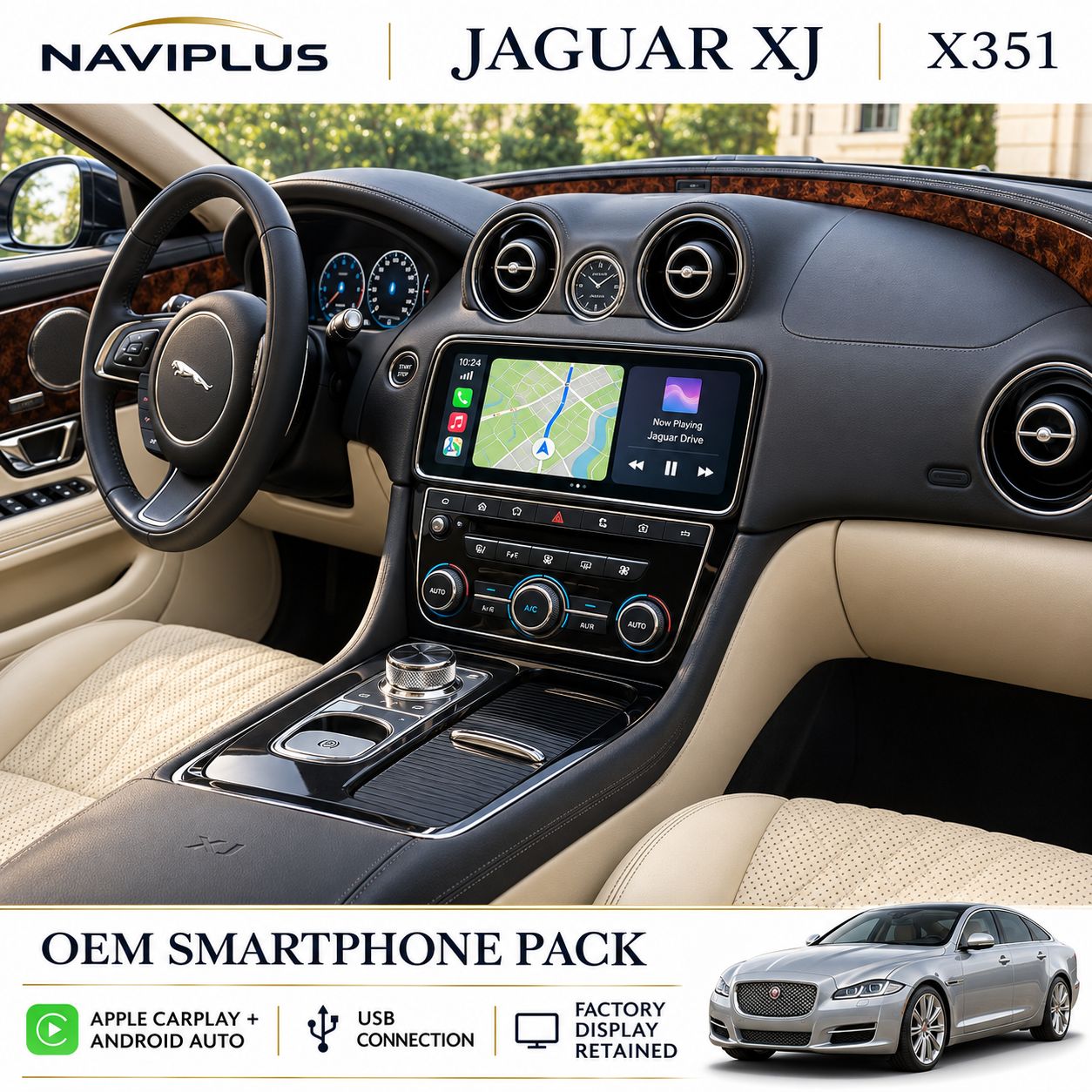
Jaguar XJ X351 OEM Apple CarPlay & Android Auto Smartphone Pack Retrofit
Store/JAGUAR/Apple CarPlay & Android Auto/InControl Touch · Four-Tile Menu/OEM Smartphone Pack Retrofit & Activation
SKU JG_XJ_OEM_NP
AU$1,800.00
1
Save this product for later
Jaguar XJ X351 OEM Apple CarPlay & Android Auto Smartphone Pack Retrofit
Store/JAGUAR/Apple CarPlay & Android Auto/InControl Touch · Four-Tile Menu/OEM Smartphone Pack Retrofit & Activation
Product Details
NAVIPLUS · JAGUAR OEM SMARTPHONE PACK
Jaguar XJ X351 OEM Apple CarPlay & Android Auto Smartphone Pack Retrofit
Original Touch Pro screen · USB smartphone connection · Melbourne installation
Bring Apple CarPlay and Android Auto to your compatible Jaguar XJ while keeping the original InControl Touch Pro display. This OEM Smartphone Pack service combines the required media-console hardware work with software preparation and activation for supported vehicles.
Compatibility · Check Your Exact Touch Pro System
Vehicle: Jaguar XJ · X351
Application guide: Later X351 widescreen Touch Pro applications; the 2018MY interior is shown as the reference. Earlier vehicles and any previous screen conversions require individual assessment.
Required system: compatible 10.2-inch-class widescreen InControl Touch Pro, with the actual screen, media hardware and software checked together.
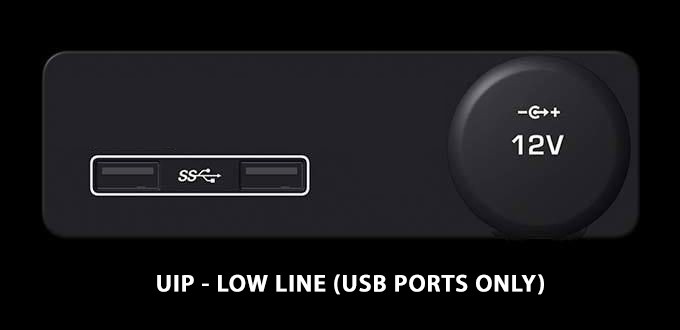
Screen check first: the earlier small 8-inch XJ display must not be treated as eligible for this widescreen OEM package. A screen / system conversion is a separate assessment and is not included in this listing. This listing is intended for eligible Low-Line UIP vehicles with USB-only media inputs that require a hardware retrofit. A model year or visible USB socket alone does not establish compatibility. Other Jaguar infotainment systems require separate assessment.
- Send your model, build year and VIN details to NAVIPLUS for assessment.
- Include a powered-on home-screen photo and a clear photo of the USB / media console inside the centre armrest.
- Include the software-version screen and details of previous audio modifications, where available.

OEM Retrofit · More Than a Software Unlock
- UIP hardware upgrade: replace the unsupported Low-Line media console with suitable Mid / High-Line hardware where required.
- Supporting wiring: install the corresponding harness and supporting components required for the assessed vehicle.
- Software preparation: update and configure the compatible InControl Touch Pro system and activate its Smartphone Pack.
- Factory menu access: Apple CarPlay and Android Auto become available through the supported Extra Features menu.
- Original dashboard retained: this service does not supply a larger screen or a replacement audio head unit.
How It Works · Wired USB Connection
Connect a compatible iPhone or Android phone using a suitable USB data cable to the designated upgraded UIP port. Open Apple CarPlay or Android Auto from the supported factory menu and use compatible navigation, music, calls and messaging apps.
This OEM package uses a wired USB connection. Audio operates through the integrated factory system; it is not the AUX / Bluetooth Media routing used by a separate aftermarket interface. App availability and features depend on the phone and app provider.
Media Console · Important Port Information
HDMI and SIM sockets are identification clues, not a guarantee that a vehicle is ready for activation. Hardware, software and vehicle configuration must be checked together.
Retrofitted HDMI / SIM ports are not enabled as part of this Smartphone Pack service. Unused openings may be covered. The purpose of the upgraded console is the internal hardware needed for USB smartphone operation.
If your vehicle already has compatible Mid / High-Line media hardware, ask NAVIPLUS whether software-only work is appropriate before selecting a full retrofit.
Installation · Melbourne / Victoria Service
- Local vehicle service: programming and hardware work require the vehicle at NAVIPLUS in Melbourne.
- Allow approximately 5–6 hours: the final booking duration depends on preparation, software state and inspection.
- Before booking: compatibility, parts, software requirements and quotation are confirmed for your vehicle.
- Completion checks: test phone connection, supported apps, sound and access to the original infotainment functions.
Frequently Asked Questions
Is this just a coding service?
Not for an unsupported Low-Line UIP vehicle. The required console, wiring and software work must be assessed together.
Will this replace my screen?
No. The compatible factory Touch Pro display is retained.
Can I choose this by model year alone?
No. Send the dashboard, media-console and system-version photos before booking.
Does this include wireless CarPlay?
The listed OEM service provides USB-connected Apple CarPlay and Android Auto.
Check Your Jaguar XJ OEM Upgrade
Send NAVIPLUS your vehicle details, home-screen photo and USB-console photo for an assessment and installation quotation.
Request Compatibility Check →Service Scope & Quotation
The quotation confirms supplied hardware, programming, installation, pricing and applicable warranty terms. Additional repairs or unrelated regional / navigation changes require separate approval. Contact NAVIPLUS before making a booking if the vehicle has an existing infotainment fault.
Display prices in:AUD