Categories
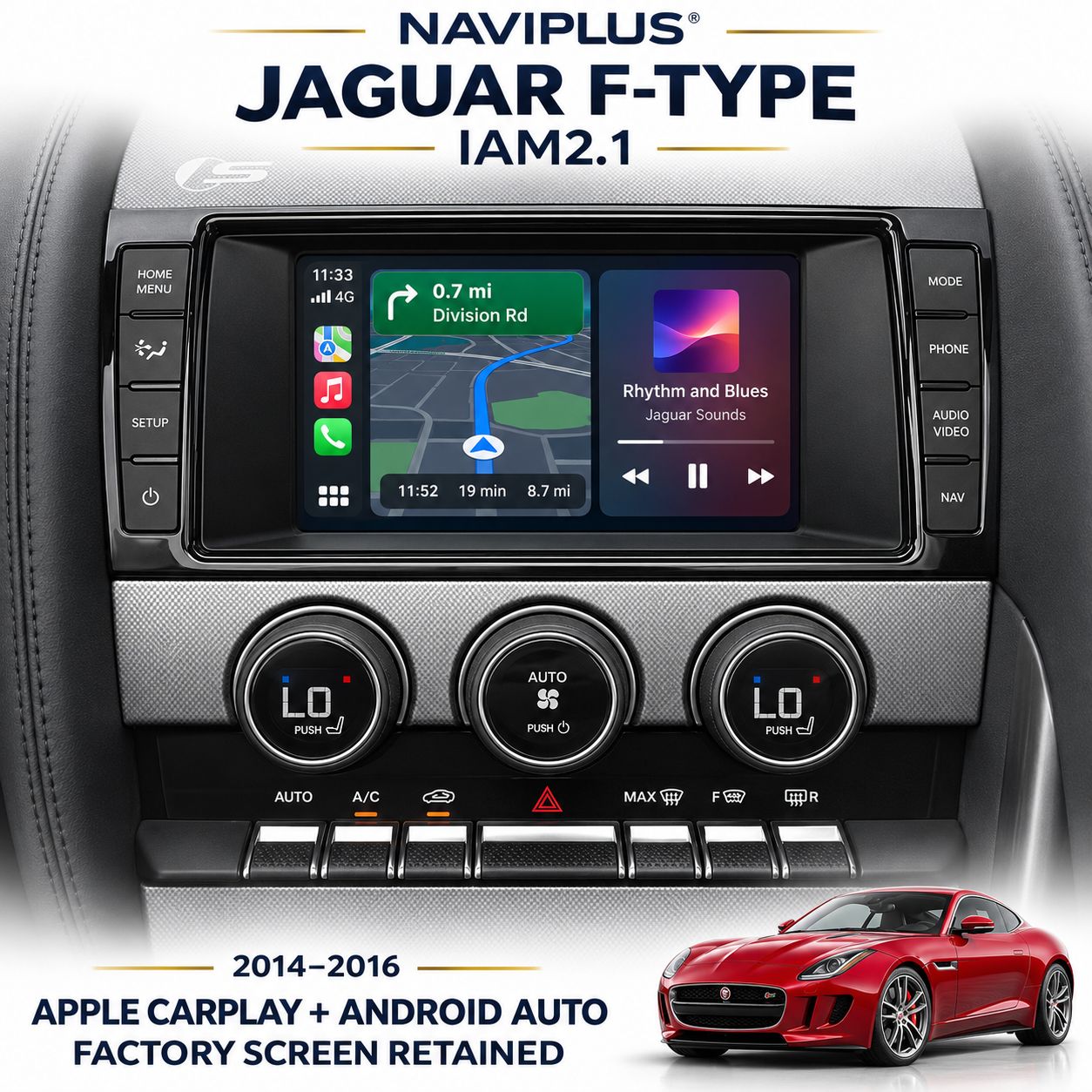
Jaguar F-TYPE IAM2.1 Apple CarPlay & Android Auto Integration
SKU JG_FT_IAM_CP_NP
AU$850.00
Optional Accessories
1
Save this product for later
Jaguar F-TYPE IAM2.1 Apple CarPlay & Android Auto Integration
Product Details
NAVIPLUS · JAGUAR SMARTPHONE INTEGRATION
Jaguar F-TYPE IAM2.1 Apple CarPlay & Android Auto Integration
Original screen retained · Vehicle-matched integration · Melbourne installation
Add Apple CarPlay and Android Auto to your compatible Jaguar F-TYPE while retaining its factory IAM2.1 display. Bring supported phone navigation, music, calling and messaging apps into the original dashboard for convenient everyday use.
Compatibility · Match This Exact System
Vehicle: Jaguar F-TYPE · X152
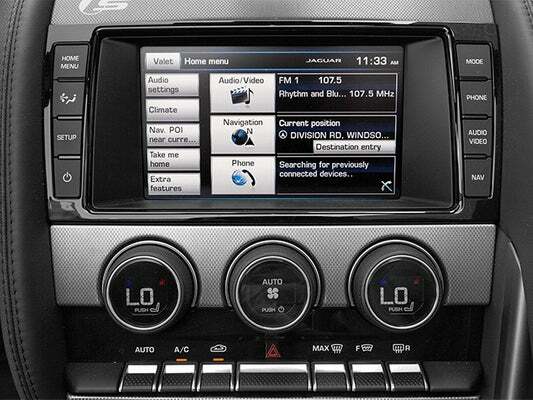
Factory system: IAM2.1
Application guide: 2014–2016
Match the IAM2 / IAM2.1 home menu, surrounding buttons and head-unit version. The physical NAV button position varies between F-TYPE, XF and XJ.
Before ordering: send the model, build year, powered-on home-screen photo, a clear view of the surrounding buttons, and the system-version screen if available. Include details of existing cameras, parking sensors and previous audio modifications.
Build year alone does not confirm compatibility. Similar-looking menus, imported vehicles and factory options can require a different interface.
Key Features · Smartphone Convenience
- Apple CarPlay & Android Auto: use supported navigation, music, calls and messages from a compatible smartphone.
- Original factory display: integration within the existing dashboard; this is an add-on interface, not a replacement screen.
- Keep access to the original system: switch between the factory infotainment and the added smartphone interface using the matched control method below.
- Vehicle-matched controls: the supplied interface is configured for the fitted screen and supported vehicle controls.
- Connection options: confirm the wired / wireless configuration supplied for the selected kit when ordering.
How to Use · Switching Between Displays
Press and hold the factory NAV button to switch between the original audio screen and the added CarPlay / Android Auto interface.
The NAV control can be in a different position on F-TYPE models. Match the actual switch and supplied interface during installation.
Audio & Calls · Correct Source Selection
The listed system uses the vehicle’s AUX / Auxiliary audio input to play the added interface sound through the original speakers.
If AUX is not available in the factory menu, contact NAVIPLUS before ordering. The required activation, retrofit or alternative audio arrangement must be confirmed for the fitted head unit; do not assume any generic USB adapter will work.
Reference Video
System-operation reference from the existing NAVIPLUS listing. Some demonstrations use a different vehicle with the same system family; confirm the exact screen and controls for your Jaguar.
Installation & Optional Requirements
- Professional installation recommended: correct trim removal, video connections, audio routing and post-installation checks help preserve the original interior.
- Existing cameras and parking equipment: provide details before purchase so retained functions and any additional integration requirements can be confirmed.
- Optional camera work: front or rear camera additions are separate requirements unless expressly included in your quotation. Confirm hardware and fitment before ordering.
- Package selection: the vehicle-matched interface, harness and required adapters must suit the actual head unit. Generic accessory graphics are not a guaranteed component list.
Frequently Asked Questions
Do I replace the factory screen? No. This integration uses the compatible original IAM2.1 display.
Will my original infotainment remain accessible? Yes. Use the matched switching method described above to return to the original system.
Can I choose by model year alone? No. Jaguar F-TYPE vehicles can have different infotainment systems. Send a home-screen photo and the surrounding buttons before ordering.
Which sound source will I use? The listed early / IAM2 package uses the original AUX / Auxiliary input. Confirm availability before purchase.
Is this a factory software activation? This listing is for an add-on integration interface. Discuss any available factory activation option separately with NAVIPLUS.
Confirm Your Jaguar F-TYPE Upgrade
Send NAVIPLUS your build details and dashboard photos for a compatibility check and installation quotation in Melbourne.
Check My Jaguar Compatibility →<summary style="font-size:20px;font-weight:700;line-height:1.5;color:#182330;cursor:pointer;;line-height:1.4;font-weight:700;">Payment & PayPal Fees</summary>
<div style="margin-top:16px;font-size:18px;">
<p style="font-size:18px;line-height:1.6;margin:0 0 16px;">PayPal is our primary online payment method. If you prefer bank transfer, contact <a href="mailto:sales@naviplus.com.au" style="font-size:18px;color:#182330;">sales@naviplus.com.au</a> to request an invoice before paying.</p>
<p style="font-size:18px;line-height:1.6;margin:0 0 16px;"><strong>PayPal transaction fees (approximately 3%) are not returned to NAVIPLUS when a payment is refunded.</strong> For an approved change-of-mind cancellation or return paid through PayPal, the original transaction fee is deducted from the refundable amount. The applicable fee is confirmed from the original payment.</p>
<p style="font-size:18px;line-height:1.6;margin:0;">Please confirm the refund breakdown with us, including any shipping, handling or restocking deductions, before returning your item. These conditions do not reduce your rights under Australian Consumer Law.</p>
</div>
</details><details open style="margin:14px 0;padding:18px 20px;border:1px solid #E7DDCD;border-left:4px solid #B78A45;border-radius:11px;background:#FFFFFF;font-size:18px;line-height:1.6;">
<summary style="font-size:20px;font-weight:700;line-height:1.5;color:#182330;cursor:pointer;;line-height:1.4;font-weight:700;">Return & Refund Policy</summary>
<div style="margin-top:16px;font-size:18px;">
<p style="font-size:18px;line-height:1.6;margin:0 0 16px;">Contact NAVIPLUS within <strong>7 days of receiving the system</strong> to request a change-of-mind return, with your order details and reason. The time periods below run from receipt of the product. Contact us before sending any item back.</p>
<p style="font-size:18px;line-height:1.6;margin:0 0 16px;">The following conditions apply to voluntary change-of-mind returns. Faulty-product remedies and other rights under Australian Consumer Law are not limited by this table.</p>
<h3 style="font-size:20px;line-height:1.5;color:#182330;margin:20px 0 12px;">Unopened & unused products</h3>
<table style="font-size:18px;line-height:1.6;width:100%;border-collapse:collapse;table-layout:fixed;">
<thead><tr><th scope="col" style="width:30%;font-size:18px;text-align:left;padding:10px;border-bottom:1px solid #E7DDCD;">Period</th><th scope="col" style="font-size:18px;text-align:left;padding:10px;border-bottom:1px solid #E7DDCD;">Return conditions</th></tr></thead>
<tbody>
<tr><th scope="row" style="font-size:18px;text-align:left;vertical-align:top;padding:10px;border-bottom:1px solid #E7DDCD;">1–7 days</th><td style="font-size:18px;vertical-align:top;padding:10px;border-bottom:1px solid #E7DDCD;">Refund less shipping and <strong>3% handling costs</strong>.</td></tr>
<tr><th scope="row" style="font-size:18px;text-align:left;vertical-align:top;padding:10px;border-bottom:1px solid #E7DDCD;">14–30 days</th><td style="font-size:18px;vertical-align:top;padding:10px;border-bottom:1px solid #E7DDCD;">A restocking fee of <strong>up to 10%</strong> applies, depending on condition.</td></tr>
<tr><th scope="row" style="font-size:18px;text-align:left;vertical-align:top;padding:10px;border-bottom:1px solid #E7DDCD;">Over 30 days</th><td style="font-size:18px;vertical-align:top;padding:10px;border-bottom:1px solid #E7DDCD;">Change-of-mind returns are not accepted.</td></tr>
</tbody></table>
<h3 style="font-size:20px;line-height:1.5;color:#182330;margin:20px 0 12px;">Products that have been installed</h3>
<table style="font-size:18px;line-height:1.6;width:100%;border-collapse:collapse;table-layout:fixed;">
<thead><tr><th scope="col" style="width:30%;font-size:18px;text-align:left;padding:10px;border-bottom:1px solid #E7DDCD;">Period</th><th scope="col" style="font-size:18px;text-align:left;padding:10px;border-bottom:1px solid #E7DDCD;">Return conditions</th></tr></thead>
<tbody>
<tr><th scope="row" style="font-size:18px;text-align:left;vertical-align:top;padding:10px;border-bottom:1px solid #E7DDCD;">1–7 days</th><td style="font-size:18px;vertical-align:top;padding:10px;border-bottom:1px solid #E7DDCD;">A restocking fee of <strong>up to 20%</strong> applies, depending on condition.</td></tr>
<tr><th scope="row" style="font-size:18px;text-align:left;vertical-align:top;padding:10px;border-bottom:1px solid #E7DDCD;">14–30 days</th><td style="font-size:18px;vertical-align:top;padding:10px;border-bottom:1px solid #E7DDCD;">Change-of-mind refunds are not accepted. Warranty service remains available.</td></tr>
<tr><th scope="row" style="font-size:18px;text-align:left;vertical-align:top;padding:10px;border-bottom:1px solid #E7DDCD;">Over 30 days</th><td style="font-size:18px;vertical-align:top;padding:10px;border-bottom:1px solid #E7DDCD;">Change-of-mind returns are not accepted. Applicable warranty rights continue.</td></tr>
</tbody></table>
<p style="font-size:18px;line-height:1.6;margin:16px 0;">For a request made on days 8–13, contact NAVIPLUS to confirm the applicable conditions before returning the product.</p>
<ul style="font-size:18px;line-height:1.6;padding-left:26px;">
<li style="font-size:18px;line-height:1.6;margin-bottom:10px;">Returned products are inspected and tested. Stored vehicle data may be checked to establish whether the system has been used.</li>
<li style="font-size:18px;line-height:1.6;margin-bottom:10px;">For approved change-of-mind returns, refunds are calculated on the product price. Shipping, installation labour and related costs are not refundable.</li>
</ul>
</div>
</details><details style="margin:14px 0;padding:18px 20px;border:1px solid #E7DDCD;border-left:4px solid #B78A45;border-radius:11px;background:#FFFFFF;font-size:18px;line-height:1.6;">
<summary style="font-size:20px;font-weight:700;line-height:1.5;color:#182330;cursor:pointer;;line-height:1.4;font-weight:700;">Warranty & Replacement Process</summary>
<div style="margin-top:16px;font-size:18px;">
<p style="font-size:18px;line-height:1.6;margin:0 0 16px;">Our products include a <strong>12-month product warranty</strong>. Please report any issue present on delivery within 7 days, with your order details and a description of the problem. This reporting request does not shorten the warranty or your statutory rights.</p>
<ul style="font-size:18px;line-height:1.6;padding-left:26px;">
<li style="font-size:18px;line-height:1.6;margin-bottom:10px;">Contact us to arrange assessment before returning the system. The buyer initially pays return postage for an item that can be readily posted; reasonable return costs are reimbursed where required for a confirmed fault under Australian Consumer Law.</li>
<li style="font-size:18px;line-height:1.6;margin-bottom:10px;">Once received, we test the system and apply a firmware update if needed. Initial testing and an update may take approximately <strong>1–2 days</strong>; this is not a guaranteed total repair turnaround.</li>
<li style="font-size:18px;line-height:1.6;margin-bottom:10px;">Following an approved warranty repair or replacement, NAVIPLUS pays for dispatch back to the customer. Systems are tested before dispatch to help minimise issues.</li>
</ul>
<p style="font-size:18px;line-height:1.6;margin:0 0 16px;"><strong>Australian Consumer Law:</strong> Our warranty and change-of-mind conditions are additional to your consumer guarantees. Statutory remedies for faulty goods are not subject to the change-of-mind time limits or fee deductions above.</p>
</div>
</details></div>
Display prices in:AUD