Categories
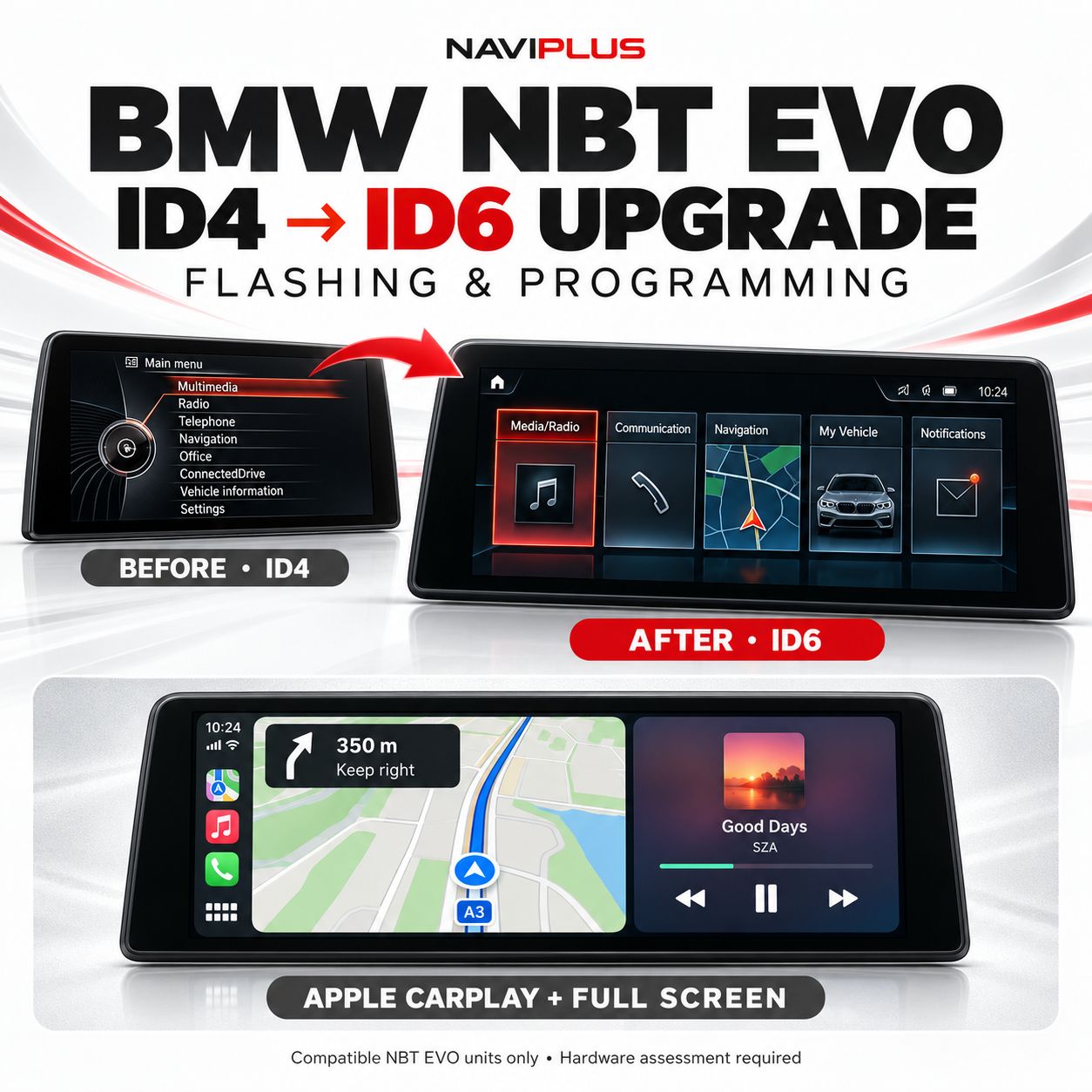
BMW NBT EVO ID4 to ID6 Upgrade – Flashing, Apple CarPlay & Full-Screen Activation
Store/BMW/BMW with NBT Evo ID5 and ID6 systems/BMW NBTevo iDrive Integrated Apple CarPlay & Android Auto/BMW CarPlay Activation + Full-Screen Activation for BMW/MINI Vehicles with NBTevo
SKU NBTevo_UGD
AU$0.00
1
Save this product for later
BMW NBT EVO ID4 to ID6 Upgrade – Flashing, Apple CarPlay & Full-Screen Activation
Store/BMW/BMW with NBT Evo ID5 and ID6 systems/BMW NBTevo iDrive Integrated Apple CarPlay & Android Auto/BMW CarPlay Activation + Full-Screen Activation for BMW/MINI Vehicles with NBTevo
Product Details
BMW NBT EVO ID4 to ID6 Upgrade
Modernise your factory iDrive with an ID6-style interface and wireless Apple CarPlay.
Naviplus offers an NBT EVO ID4 to ID6 flashing and programming service for compatible BMW head units, including Apple CarPlay activation and full-screen configuration as part of the agreed upgrade.
Enjoy supported iPhone navigation, music, calls and messaging through the factory display, without replacing it with an aftermarket screen.
NBT EVO ID4 only — compatibility assessment required.
Standard NBT and NBT EVO ID4 can have similar menus. Please send your VIN and complete software-version photo before ordering.
Upgrade Highlights
- ID4 to ID6 programming: update a compatible NBT EVO head unit to the newer interface.
- Wireless Apple CarPlay: supported iPhone apps through the factory infotainment system.
- Full-screen CarPlay: configure the supported CarPlay display layout.
- Factory appearance retained: use the existing display and supported original controls.
- Vehicle-specific assessment: confirm hardware, navigation and software requirements before programming.
Installation Reference Video
Reference demonstration. The final configuration and available functions depend on the installed hardware and agreed service.
Compatible Vehicles & Systems
Examples for assessment include the following vehicles when fitted with NBT EVO ID4:
- BMW 1 Series — F20 / F21.
- BMW 2 Series — F22 / F23.
- BMW 3 Series — F30 / F31.
- BMW 4 Series — F32 / F33 / F36.
- BMW M2 / M3 / M4 — F87 / F80 / F82 / F83.
These systems are commonly associated with the 2015–2016 transition period, but build date and model alone do not establish compatibility.
This package does not apply directly to CIC, standard NBT or EntryNav systems. Other head units require separate assessment.
Hardware & Factory Navigation Assessment
Early NBT EVO ID4 units may have different memory specifications from later ID5 / ID6 hardware. Flashing software does not physically increase the unit's memory.
We assess the proposed configuration, including whether factory navigation can be retained and whether additional hardware work or a replacement unit should be considered.
Please confirm factory navigation requirements before booking. Using navigation apps through CarPlay and retaining the original BMW navigation are separate requirements.
Existing rebooting, freezing or startup faults must be disclosed. An ID6 upgrade is not a repair for an undiagnosed hardware fault.
Apple CarPlay & Connection Requirements
The agreed upgrade includes wireless Apple CarPlay activation and full-screen configuration on the approved system.
Wi-Fi antenna requirements are checked before installation. An antenna or other additional hardware is included only where specified in your quotation.
Use a compatible iPhone with Bluetooth, Wi-Fi and Siri enabled. Operation uses supported factory controls; touch operation requires an existing compatible touchscreen.
Android Auto is not included in this NBT EVO software upgrade. Please enquire separately about Android Auto integration.
How to Check Your System Version
- Open the factory Navigation screen.
- Press the OPTIONS button on the iDrive controller.
- Look for Settings, Position and Version, or Version Information.
- Send a clear photo of the complete screen showing NBTevo_... and the map information.
Menu wording varies. If the version is not visible, send your VIN and main-menu photo for assistance. The NBTevo prefix is an initial identification check, not an upgrade guarantee.
Map Data & Software Preparation
Navigation map data and head unit firmware are different. Updating the maps alone does not convert ID4 to ID6.
If factory navigation is to be retained, we check the map region, data compatibility and activation requirements. Any required map update or licence work is confirmed in the quotation.
Before Booking
- Send the model, build date, VIN and software-version photo.
- Advise whether factory BMW navigation must be retained.
- Disclose previous flashing, coding, replacement parts and aftermarket equipment.
- Report any existing restarting, freezing, audio or GPS faults.
- Do not order a replacement head unit or additional parts until compatibility has been confirmed.
Upgrade suitability, included functions, additional parts, turnaround and service terms are confirmed before work begins.
Check Your BMW for an ID6 Upgrade
Send your VIN and system-version photo to check the available ID4 to ID6 upgrade, CarPlay and full-screen options.
Check Compatibility & Get a QuoteDisplay prices in:AUD